TiltLab · Machine 01 · On the floor
Chrome Orbit
A steel ball, two flippers and one more shot at the stars. The first TiltLab machine, and the one every later table starts from.
The idea
Can a browser tab make a steel ball feel heavy?
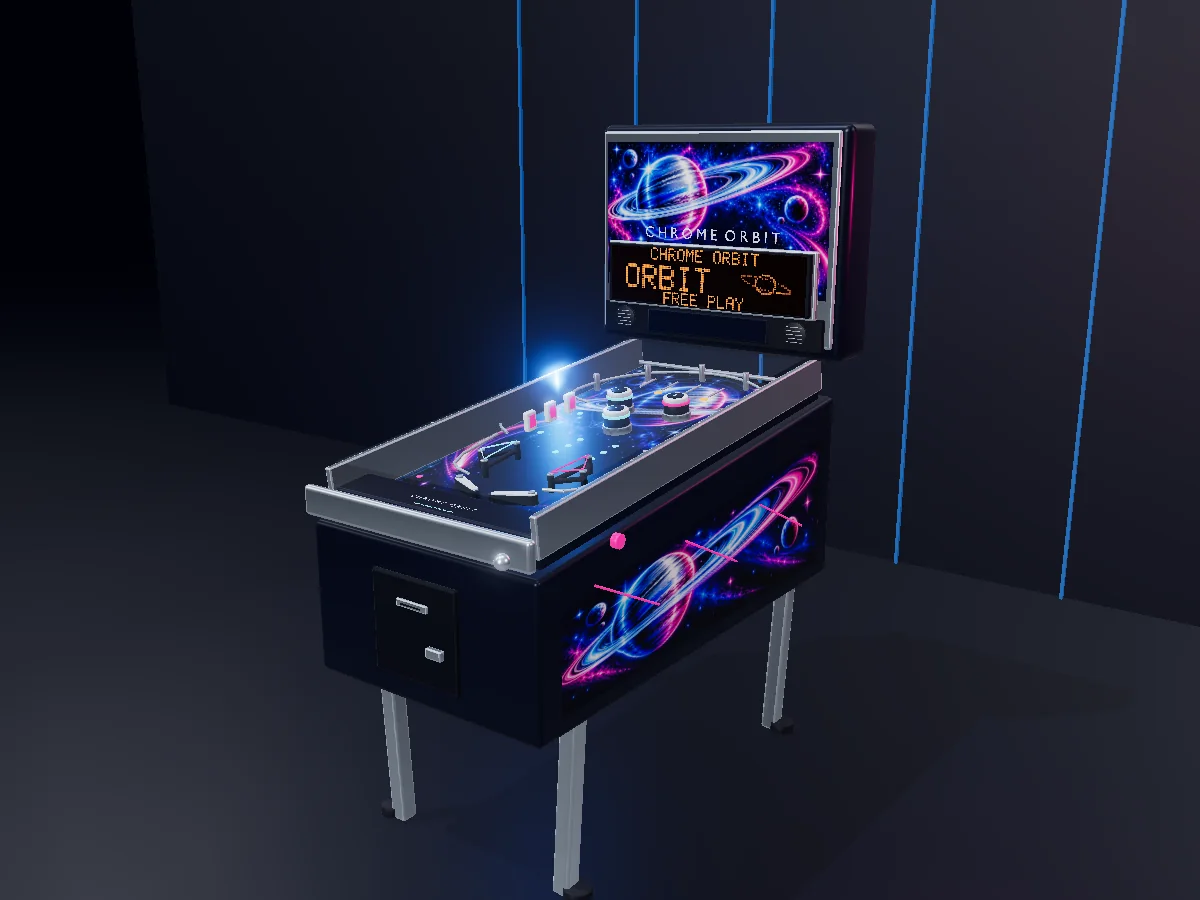
Chrome Orbit is a small table on purpose. It has one goal, one big shot and three balls to learn it with.
The cabinet is modelled in Blender and drawn with Three.js. The ball is real physics, not an animation. It rolls, bounces and loses speed the way the collision shapes say it should, 120 times a second.
The art is chrome and airbrush: brushed steel rails, a cosmic backglass and an amber dot-matrix display. It looks like a machine you might find in a 1990s arcade that had big plans for space.
On the playfield
Every part, and what it pays.
| Part | How many | What it does | Points |
|---|---|---|---|
| Flippers | 2 | Hold to catch the ball, release to settle it, flip as it reaches the tip. A ball left sitting on a flipper rolls free on its own. | – |
| Plunger | 1 | Pull back and let go. A longer pull sends the ball farther up the shooter lane. A weak shot rolls back and you try again. | – |
| Pop bumpers | 3 | Kick the ball away the moment it touches them. | 100 |
| Slingshots | 2 | Rubber kickers above the flippers that snap the ball sideways. | 25 |
| Top lanes | 3 | Rollover switches across the top of the table. | 100 |
| Magenta targets | 3 | The bank on the left. Hit all three to light the jackpot. | 250 |
| Orbit | 1 | The loop around the top. Worth 500, or the 3,000-point jackpot when the bank is lit. | 500 / 3,000 |
| Dot-matrix display | 1 | A 128 × 32 amber display in the backbox: score, ball number and the big moments. | – |
The rules
Light the bank. Ride the orbit.
- Three balls. The game ends when the third one drains.
- A free second chance. Each ball gets one six-second launch save. Drain during it and the same ball comes back.
- The jackpot. Hit the three magenta targets, then send the ball around the orbit for 3,000.
- Draining resets the bank. Lose the ball and the targets go dark again.
- Your best score stays. It is saved on this device, along with your sound and effects settings.
What you hear
Two kinds of sound in one cabinet.
A real pinball machine makes noise two ways. The parts make it with coils, rubber and steel. The speaker makes it on purpose. Chrome Orbit does both, and none of it is a recording: every sound is built in your browser while the machine loads.
The parts · shared by every TiltLab machine
- Flipper coils: the clack up and the softer drop back.
- Pop bumpers and slingshots: a hard thump with a little cabinet rattle.
- Rollovers and targets: a wire tick, a plastic tock.
- Steel and wood: the ball pinging off rails, thudding off walls.
- The rolling ball: a low rumble that rises with speed and follows the ball left and right.
- Plunger, drain, trough and knocker: the spring, the clunk into the trough, the kick of the next ball, the bang of a big award.
- The cabinet: a quiet transformer hum, the way a real machine sounds when it is switched on.
The speaker · Chrome Orbit only
- Bumper chord: each bumper has its own note, so a busy cluster plays a chord.
- The climbing bank: one note higher for each magenta target.
- The orbit: a whoosh that rises as the ball goes around.
- Jackpot: the knocker, then a bright run of bells.
- Launch, ball save, drain, start and game over: short cues in the same cold, starry key.
- Space bed: a slow, quiet pad under the hum. Turn off "Arcade atmosphere" in Settings for silence between shots.
Under the glass
What makes it run.
- Cabinet
- Modelled in Blender and exported as one 9.4 MB file. The playfield and backglass art were made with image generation.
- Rendering
- Three.js r185 on WebGL 2, with real-time shadows, bloom on the lamps and a light camera motion blur.
- Physics
- Rapier 0.21 at a fixed 120 steps a second, eight solver substeps each. Motor-driven flippers, a spring plunger, and continuous collision checks so a fast ball cannot slip through a rail.
- Display
- 4,096 separate amber dots, drawn in a single pass.
- Loading
- Every one of the machine's 48 files, about 16 MB, arrives before the first ball. Then every shader is compiled, every texture uploaded and every camera view rendered once, so nothing stalls mid-game.
- Sound
- 34 sounds and 73 takes, built when the machine loads and shuffled as you play so repeats do not sound identical.
- Controls
- A / ← and D / → for the flippers, Space for the plunger, Esc to pause. On a phone, play upright with two thumbs. Drag to look around the cabinet; pinch or scroll to zoom.
- Comfort
- A low-effects switch for slower devices. Camera motion stays still when your system asks for reduced motion.
In the lineage
The root of the line.
Chrome Orbit is TiltLab's first machine, so the next table starts from what this one built: the shared sound kit, the start-up loader, and the physics rig that turns a Blender file into a playable table.
Each later machine will add one new idea and keep what worked. Its About page will say what it carried forward from here.
Play Chrome Orbit · Read the Advisory Hour build story · Back to TiltLab · GameLab has the rest of the arcade.