Originally published as an Advisory Hour Substack post on 2026-09-16. This first-party site copy preserves the text, localizes public supporting media, and connects the record to its project trail.
Original post

It’s weird to have strong, positive feelings about the skill.md specification. I admit that. I’ve never had a specification just solve so many problems for me that it’s hard not to have such feelings. In today’s article, let me share my joy of this specification.
The most frequent website I visit these days isn’t google, it’s skills.md which redirects you to agentskills.io. I access the website to get the markdown version of how to build a proper skill definition and feed that into a clean agent harness. Many of the newer agentic platforms are performing automatic skill creation and curation, and yet I find knowing the intimate details of skills and how they should operate to be quite useful in giving directions to agents.
---The Frontmatter ---
The skill front matter has only two required fields. The name and the description. The name field supports up to 64 characters of lower, upper-case letters and hyphens so long as the name doesn’t start or end with it. The description field is 1024 characters of context. One can pack a lot of context into a description, and the downside is that it’s like junk mail in your mailbox. Maybe all that context is relevant. Maybe it’s not.
Have you ever wondered what’s in a name?
ALL naming is important because it conveys semantic context to the LLM (and humans!), which we know has an outsized impact on how the model “chooses” to use a skill.
Consider a skill named static-site-maintenance. How might the LLM tokenizer “see” that skill? Here’s three different tokenizers used by OpenAI models.

The temptation would be to reduce down the skill to something like “site-update”, however, what I’ve found is intentionally pushing the model with a reminder that it’s working a static site not “general site update” keeps away certain ideas that LLMs otherwise might drift into. A specific problem I was having is that some models would think the “site” needed to be dynamic, and so I increasingly find myself being overly clear in naming not just skills but the project folders themselves. Further, a “requirement” for skills is that the name reflect the folder name the skill is located in. Many modern harnesses allow for some flexibility around this, but I find humans and AI both don’t do well with ambiguity. Strive for clarity.
Let’s take a little detour for a moment because I find the Codex code-base just so darn interesting. Codex implementation of parsing skills is a bonus tour of history of this specification. For example, you might stumble down a rabbit hole around legacy skill.md fields such as short_description. The short_description isn’t a field supported in today’s version of skill.md. However, for a time it was.
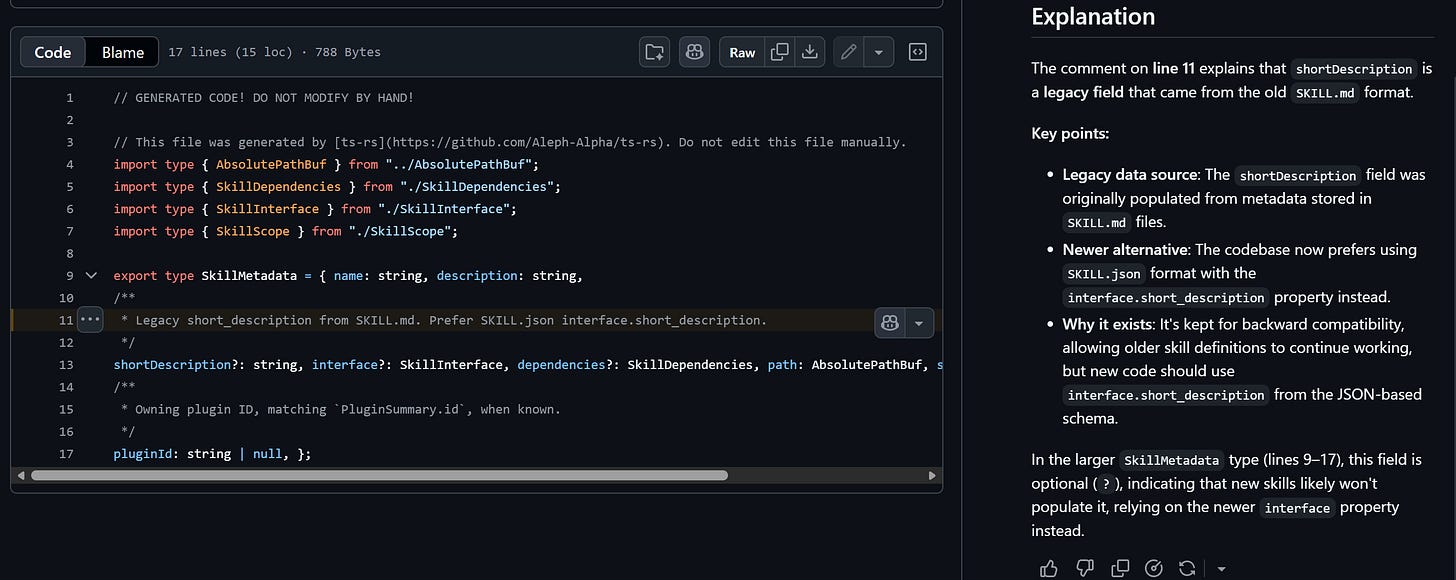
There’s so much in Codex CLI and just skill activations that we’ll need to return to this topic later. Let’s get back into skill.md and how it works, beyond Codex.
The Progressive Disclosure
Agent Skills follow a common convention in all the agent harnesses I’ve used. The disclosure process has three steps: Discover, Activate, Execute. The layered approach is a context management solution that keeps the context nimble so you can continue the work at hand.
Each skill has those minimally two required fields of name and description. Those are pulled in and injected into the context (it’s always slightly more complicated than this, of course). The way this is done per agent somewhat differs, and for illustration purposes think of it as building a catalog of skills. The catalog ships up with the request to the model, and then the model can then choose to activate a specific skill.
The activation step is the model following the recipe guide of what your custom skill is all about. The activation step happens in the skill.md file itself. The skill.md file is one file in a folder that contains your skill. There’s a tendency for these skill markdown files to get very large, and the temptation is definitely there.
For example, a typical best practice around skill.md files suggests that you ought do the following.
Cohesive frontmatter. A more well-built out frontmatter over just the minimum: name, description, at the very top of the file. This frontmatter, which is just a section of text wrapped in a starting and ending set of characters denoated by ---, is like the FDA label on the back of a food product. Everything you need to know about the contents of the skill.
Skill abstract. The remainder of the skill markdown is how that food product is to be used. It’s the cookbook, to stretch the metaphor. The first step after the front matter is just noting what the skill does. An organized description around the skill, yes, beyond the description that’s in the front-matter. Imagine as if the front-matter were being peeled off and the agent never got to see that section, and now you had an opportunity to write more expansively about what the skill actually does.
Pre-requisites Include a pre-requisite checklist to ensure the environment is properly situated to use the skill. What libraries need installed, what conditions must be true to use this skill, etc. To continue our cooking example, “One metal pot is required.”
The step-by-step guide for the agent to follow to install the requirements and also to make sense of the steps the agent needs to take. This might flow like “Get one metal pot out of the pantry and place it on the stove. Next, pour the ingredients from package into the pot."
In theory, one could stop there. In fact, you’ll often find slimmed down skill files that have just have the bare minimum: name, description and a short guide on what to do. There’s nothing wrong with those skills. Where a skill gets more powerful is packing in or making use of that “references” folder that’s part of the skill definition.
Adding Scenarios, FAQs and Troubleshooting
Let’s take a moment to recall what goes in the skill folder itself. Meaning, what all shows up in the folder containing that skill.md? A skill folder contains not just a skill.md. The folder contains files and folders like a .gitignore, a scripts folder, a references folder and an assets folder. These three folders are optional. They’re noteworthy as the three named folder examples for skills in the official specification. You can, of course, have other folders beyond these.
The skill.md file, your markdown file that describes the skill, can contain a troubleshooting FAQ. Further, if you find you have a particular problem with too many problems that a particular skill runs into then you can push the agent to just check a troubleshooting guide that you (or the agent) maintain in the references folder. The skill markdown might have something like “Issues, Errors and Troubleshooting are covered in the References/faq, References/troubleshooting” files. Keep in mind that many agents like to use ripgrep to turn up context and solutions, which should drive how you both name files, organize folders, and also organize the context in those folders.
The references folder may also contain other useful things-things such as usage examples, or even more complex scenarios for multi-step workflows.
I wouldn’t sleep on the scripts folder. The scripts folder is a marvel. It’s a marvel because it allows you to pack an entire runtime inside the folder and really just drive a dizzying array of capabilities. This can mean invoking specialized AI models, legacy applications, or even MCP connectors.
The third folder is the assets folder. I like to think of this more like the “Content” folder common to a lot of websites. You can have images, documents, or even references to your blob storage accounts stored here. An asset is a broad term, and I like to think of this as a useful resource for the script and AI to use, guided by the content of the reference folder.
From three folders and back to three disclosure steps
I mentioned there are three steps in the progressive disclosure process. First was knowing what skills exist and building the catalog, or the discovery process. Second was the activation process, which is reading the cover story of how the skill works like a mini-program. The third then should be an intuitive jump: run the program.
Something that’s overlooked and can be quite useful over the longer haul are Evals on your skills. Unless you intend to operate on a named keyword match-meaning, “Look Eric, I only want the skill to activate when I use the exact hyphenated name of static-site-maintenance” then you’ll want some amount of flexibility for when the LLM goes thru this discovery-activation-execution process.
Does it mean I need to test the skills?
Yes, this means you need to test the skills. The structured way of solving this is building a set of evaluations that identify when the skill should trigger and also when it should not trigger. There’s four tuning forks for this eval construction process. They are Phrasing, Explicitness, Detail, and Complexity.
Phrasing is where most start, and unfortunately, stop at. How many different phrases should and should not trigger your prompt?
Explicitness tests what happens with very human things like typos and having files in the wrong places. How error tolerant is the skill if it’s “do the thing bro” to “activate static-site-maintenance on commit 05ebff and relay to discord using discord-relay.” Skill chaining is something I’ve not even covered, but you can see in this short example the complete outrageous power of what that provides.
Detail builds on the explicitness and unfolds it in a longer way. How does the skill do if you fold really large amounts of detail versus shorter? Does it still behave the same?
Complexity is the real gem in the four tuning forks of phrasing, explicitness, detail and complexity. How does your skill do in multi-step turns? Does the agent handle it well and know when to activate the skill?
These four considerations are part of a structured evaluation for your skill. The reason you want to test them isn’t so much that your skill isn’t effective today. It’s because you’re going to change the model. When you change a model, your harness and setup you’re going to want to know if the skills are evaluating the same or if there’s been a notable disruption that you need to resolve. Best case is that your tests around the skill all pass. Worst case is you need to tweak your skill and try again.
Today’s article was a fun tour of the ins and outs of the skill.md specification. Even as much as I’ve covered, there’s still more nuance and details a few layers in. For example, it sounds nice to have an eval around skills. How does one even go about it? Well, in a lot of ways it’s similar to building any other test automation harness. I’d encourage you to start here.
Connected work
- Writing: Browse essays and notes about craft, tools, and clear explanation.
- Coding Model Applied Research Guide: See a working guide that uses progressive disclosure and concrete rules.
- Pixel Art Skill.md: Read an earlier field example built around a reusable agent skill.